
30th August 2026, Nipuna Weerasinghe
A couple of weeks ago I published Your DLP Strategy Has a Blind Spot: AI Tools Are Walking Right Through It, which came out of a conversation with a security lead at a large enterprise. His team had done everything by the book sensitivity labels, Endpoint DLP, Defender for Endpoint and was confident they were ready to roll out Copilot and Claude as approved AI tools. Then I asked one question: “What happens when a user types something sensitive directly into the Claude browser prompt window?” Silence. We tested it on the spot a fragment of an internal pricing model, typed straight into the prompt, no file involved. Traditional Endpoint DLP alone not capable enough to detect many AI prompt submission scenarios, particularly where content is typed directly into a web form rather than originating from a protected file or monitored endpoint activity.
That post made the case that the new exfiltration path isn’t a file, it’s a prompt and that Endpoint DLP, for all its strength on USB, print, and clipboard, is structurally limited visibility/ blind to keystrokes typed into a browser. The fix I laid out was Inline DLP, which inspects the content of the prompt itself in real time, with two delivery models: Microsoft Edge for Business, which inspects inline the moment a user signs in with their Entra ID work profile, and Secure Service Edge (SSE), Microsoft’s Global Secure Access which inspects the same traffic at the network layer via a cloud proxy, without dependency on a specific browser, with enforcement occurring through Global Secure Access rather than within the browser itself. The takeaway was that one layer alone isn’t enough: Edge for Business protects the users who sign in and stay in Edge, and SSE extends protection beyond Edge to supported traffic routed through Global Secure Access across multiple browsers and applications.
That post established why Inline DLP matters and that GSA/SSE changes its reach. What it didn’t do is walk through the mechanics of exactly how those two delivery models differ under the hood where the inspection actually happens, how the Purview handshake works in each case, and where each one’s blind spot sits. That’s worth its own, deeper pass.
As a quick refresher on the Endpoint vs Inline distinction before we go deeper:
| Feature | Endpoint DLP | Inline Protection DLP |
| Primary focus | Device level file manipulation | Data being transmitted to the web |
| How it inspects | OS level monitor system actions | Inspects web traffic and native browser requests |
| Typed text protection | Cannot see text manually typed into web forms | Can block sensitive prompts typed into GenAI |
| Device requirement | Requires fully managed/onboarded corporate devices | Works on unmanaged/BYOD devices via corporate browser profiles |
| Key use cases | Blocking USB copying, local printing, clipboard use | Blocking sensitive text prompts to ChatGPT or unapproved cloud apps |
And the practical test I’d apply to any of it if an employee tries one of these, which control actually catches it?
| If an employee tries to… | Endpoint DLP | Inline Protection DLP |
| Copy a file to a USB stick | Blocks it | Misses it |
| Print a confidential document to a home printer | Blocks it | Misses it |
| Type customer data into an AI website | Misses it | Blocks it |
| Upload a file to a personal cloud drive | Blocks it (file level) | Blocks it (web level) |
Endpoint DLP sees a file leaving a managed device, Inline DLP sees sensitive content crossing the web boundary, they’re just two different vantage points on the same transaction, which is exactly why relying on only one leaves a gap the other was built to close.
The Real Question Isn’t “Do We Have DLP?” It’s “Where Can We Actually See the Data Move?”
Before getting into GSA specifically, it’s worth restating a principle that shapes everything that follows: DLP was never meant to be one control. It’s an architecture made up of multiple enforcement planes endpoint, browser, network, and cloud/SaaS each with different visibility into a different slice of how data actually moves. The mistake I see most often in DLP designs is treating one plane (usually Endpoint DLP, because it’s the most mature and familiar) as if it provides complete coverage. It doesn’t, and it was never meant to.
Inline DLP is the clearest place this shows up, because Inline DLP behaves completely differently depending on whether Global Secure Access sits underneath it.
Inline DLP Without GSA: Protection Lives Inside the App
Without GSA, Inline DLP protection is delivered through the applications themselves almost entirely through Microsoft Edge for Business. When an employee signs into Edge with their corporate identity, the browser reaches out to Purview, pulls down the organisation’s DLP policies, and enforces them locally, inside the browser’s own code. If someone tries to paste sensitive customer data into a web form or upload a confidential file through Edge, the browser itself recognises the policy match and blocks the action before it ever leaves the device.
The catch is right there in how it works: the protection only exists inside that sandbox. The moment an employee opens Firefox, Chrome (without purview extension), or Opera instead, or moves the same data through a non-browser channel the Slack desktop client, a native app, a command-line tool that traffic never touches Edge’s policy engine at all. It isn’t blocked. It isn’t even seen.
Feature snapshot Inline DLP without GSA:
- Where it inspects: Inside the specific browser or app itself
- Browser freedom: Effectively restricted to Microsoft Edge for Business
- Application scope: Supported web browsers and integrated M365 apps only
- How traffic is routed: The browser extension or native browser code handles inspection locally, with no network-level rerouting involved
For organisations that have standardised on Edge and don’t have significant Slack/Zoom desktop/custom-API exposure, this is a genuinely reasonable, low-friction deployment. The trade off is coverage, you’re protected exactly as far as your browser standardisation actually holds in practice and in most real environments, it doesn’t hold perfectly.
Inline DLP With GSA: Protection Moves to the Network Pipe
Bring Global Secure Access into the picture and Inline DLP stops being an app level feature and becomes a network level filter that doesn’t care which application the user opened.
Here’s the mechanism: a lightweight GSA client sits on the device, and once it’s active, outbound internet traffic from that machine is routed through an encrypted tunnel to Microsoft’s cloud delivered gateway, not just browser traffic, all of it. GSA decrypts (where TLS inspection is enabled) that traffic at the gateway and runs what’s effectively a real-time handshake with Purview: is this content allowed to leave? Purview evaluates it against the same classification and DLP engine driving every other Purview control, and returns an allow or block decision back to GSA before the traffic ever reaches its destination.
The practical difference this makes is significant. It no longer matters whether the user is in Chrome, Firefox, Safari, or Edge or whether they’re not in a browser at all. If someone tries to push proprietary source code out through a command-line tool, or upload a sensitive file via the Slack desktop app rather than Slack-in-browser, GSA is inspecting that traffic at the network pipe, upstream of the application layer entirely. The application choice stops being a variable the security architecture has to account for.
Feature snapshot Inline DLP with GSA:
- Where it inspects: At the network pipe itself, via the SASE-style gateway
- Browser freedom: Works across any browser Chrome, Firefox, Safari, Edge
- Application scope: Catches non-browser traffic too, desktop apps, custom APIs, CLI tools
- How traffic is routed: A network client routes all internet-bound traffic through Entra’s gateway, rather than relying on any single application’s local enforcement
The Trade-off Isn’t “Better vs Worse” It’s Coverage vs Deployment Effort
This is the framing I’d give a client evaluating the two, and it’s worth being upfront about rather than presenting GSA as a strictly superior option in every case. Inline DLP without GSA is simpler to stand up no network client rollout, no rearchitecting how traffic leaves the device and for a genuinely Edge-standardised estate, it closes most of the realistic gap. Inline DLP with GSA is a heavier lift architecturally, but it closes the coverage gap that browser only enforcement structurally can’t close, the moment “much broader range of browsers, app, protocol” matters to your risk profile which, increasingly, it does GSA is the only one of the two that actually answers for it.
The two questions I’d put to any organisation weighing this up: are your users genuinely confined to Microsoft Edge, or do they need Chrome and other browsers for legitimate business reasons? And separately: are you optimising for the simplest possible deployment, or for maximum coverage across every internet protocol a user might reach for? Those two answers, more than any feature comparison, tell you which side of this you actually need.
Worth flagging too: neither option switches on for free. As covered in the previous post, Inline DLP sits behind a specific set of prerequisites Microsoft 365 E5 or E5 Compliance, Pay-As-You-Go billing for the cloud inspection infrastructure, and related Purview, Defender, or Entra services
Where Defender for Cloud Apps Fits Alongside GSA
Defender for Cloud Apps (MDCA) already showed up above as a prerequisite for sanctioned-vs-unmanaged app awareness, but it’s worth being precise about what it actually adds on top of GSA, because the two get conflated more than they should.
MDCA’s real strength is that it enforces Conditional Access at the session and application level, specifically for sanctioned SaaS apps. Picture a user uploading a file to ServiceNow or Workday: MDCA can allow that upload but stamp the file with a sensitivity label as it goes, so only the right account on the right endpoint can actually open it once it lands in the destination app.( But it’s worth mentioning Microsoft’s changes to file based data protection in MDCA.) That’s a genuinely different capability to blocking or allowing traffic it’s shaping what happens to the content after it arrives. MDCA also brings app governance into the picture: visibility into which apps hold excessive or unused privileges, and exfiltration detection through the M365 connector a mass deletion sweep through SharePoint or OneDrive, for instance, can trigger an alert straight to the SOC as a signal of real organisational risk, not just a policy violation.
Where GSA pulls ahead is scope. GSA inspects at the network layer, which means it genuinely doesn’t care which SaaS app is involved, and it doesn’t care which account is being used to access it either a test account, a personal account, an organisational account, all of it gets the same Purview backed scanning and monitoring. MDCA’s session level policies are built around sanctioned apps and managed identity context; GSA’s coverage extends to exactly the accounts and applications MDCA was never designed to see in the first place.
The practical read for an architecture design: MDCA is the tool for governing how sanctioned SaaS applications behave session policies, label aware file handling, privilege visibility, exfiltration alerting. GSA is the tool for making sure nothing slips past because of which app or account someone happened to use. Neither replaces the other, and in a mature Purview estate, they’re usually running together rather than as a either/or choice.
Zooming Out: This Is One Layer in a Much Bigger Architecture
It’s worth placing this GSA vs no-GSA comparison inside the wider picture, because Inline DLP with or without GSA is still only one plane in a layered DLP architecture that also includes Endpoint DLP (the OS level layer covering USB, print, and local file movement) and, above both, the identity and risk context that Entra and Conditional Access provide.
The architecture that’s actually emerging looks less like a single product decision and more like this:
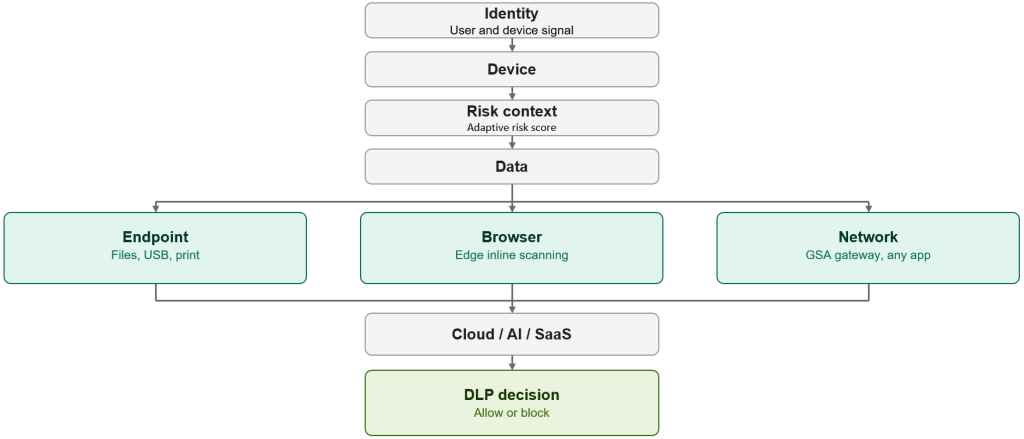
Put in a straight side by side, the three planes stack up like this:
| Capability | Endpoint DLP | Browser Inline DLP | Network Data Security (GSA) |
| Primary layer | OS/device | Browser | Network |
| USB | Strong | No | No |
| Printing | Strong | Supported scenarios | No |
| Local file activity | Strong | Limited/contextual | No |
| Browser upload | Yes, endpoint scenarios | Yes | Potentially |
| Text typed into AI | Limited, depending on scenario | Strong, supported scenarios | Network layer capability |
| BYOD | Limited | Supported scenarios | Different architecture |
| Desktop applications | Strong endpoint visibility | Browser-focused | Broader network visibility |
| SaaS | Endpoint context | Browser context | Network context |
| APIs/add-ins | Limited | Browser-dependent | Network-layer scenarios |
| AI governance role | Important | Important | Strategic |
| Device dependency | High | Lower in some unmanaged-device scenarios | Network access dependent |
| Primary architectural value | Device control | Browser control | Network control |
The pattern in that table is the whole argument of this post in one place, no single column is “the answer.” Endpoint owns USB and printing outright; Browser Inline owns typed AI prompts in supported scenarios; Network/GSA is the only column that maintains coverage when users move beyond a specific browser or application, provided traffic is routed through Global Secure Access. Design for the row, not the column, pick the plane that actually has visibility into the exfiltration path you’re worried about, rather than assuming your strongest existing control (usually Endpoint) has you covered everywhere.
A genuinely useful way to stress test any DLP design is to stop asking “do we have DLP?” and instead walk through the real exfiltration paths one at a time USB, print, browser upload, AI chat prompt, desktop app, API and ask of each one: which enforcement plane can actually see this transaction? If the honest answer for several of those paths is “none of them,” that’s the gap the architecture needs to close, and it’s usually where GSA earns its place rather than being a “nice to have” network add-on.
It’s also worth resisting the instinct to move every policy straight to hard block. The organisations that get the best long term outcomes from DLP, Endpoint, Inline, or Network layer tend to follow a Discover → Audit → Tune → Warn → Enforce progression rather than switching on blocking enforcement from day one. A policy that blocks legitimate business activity before it’s been tuned against real traffic doesn’t make an organisation safer; it just teaches users to find a workaround, which is usually the exact outcome the policy was trying to prevent.
Where This Leaves Zero Trust
The reason this all sits under a “Zero Trust” banner rather than just being a DLP feature comparison is that it’s a direct expression of two of Zero Trust’s core principles. Verify explicitly means not assuming a browser choice or application is trustworthy just because it’s running on a corporate owned device, GSA’s network layer inspection verifies the content of the transaction itself, regardless of which app carried it. And assume breach means designing controls that don’t rely on a single point of enforcement holding perfectly if Edge only Inline DLP is your only line of defence and a user simply opens Chrome instead, that single point of failure is exactly the kind of gap “assume breach” thinking is meant to close.
Endpoint DLP, browser based Inline DLP, and GSA backed network DLP aren’t competing approaches. They’re three enforcement planes answering three different questions about the same underlying problem and increasingly, in an AI-driven, multi app, multi browser reality, the organisations getting DLP right are the ones building for all three rather than picking one and hoping it’s enough.
If you’re weighing up whether GSA is worth the deployment effort for your organisation, the two questions that matter most are: how genuinely standardised is your browser estate today, and how much of your realistic risk surface sits outside the browser entirely in desktop apps, APIs, and non-Edge browsers your DLP policy currently can’t see at all?


One thought on “Zero Trust Aligned DLP Architecture for the AI Era: Where Inline DLP Meets Global Secure Access”