
25th May 2026, Nipuna Weerasinghe
I have been helping various types of clients over the last decade protect their sensitive information from being lost using Data Loss Prevention (DLP). During this time, I have seen different types of tools and technologies used by various service providers to achieve this.
For decades, DLP has been built around a simple mental model: sensitive data lives in files, and files move through predictable channels. Email attachments. USB drives. SharePoint uploads. SaaS sync clients. We got very good at watching those channels.
But this model is not enough anymore due to the generative AI tools introduced to your organisation, as the new exfiltration path isn’t a file, it’s a prompt.
Users are pasting customer lists, source code, internal strategy docs, M&A drafts, salary tables, all of it into digffrenet AI tools such as Microsoft 365 Copilot, ChatGPT, Claude, Google Gemini, DeepSeek, etc.
The problem isn’t that people use them it’s that most traditional DLP stacks can’t see what’s being typed into them, regardless of which one it is.
The Moment That Changed Thinking
Recently I spoke with a security lead at a large enterprise. They were well into their journey of becoming an AI-enabled organisation. They had checked every governance box sensitivity labels, Endpoint DLP, Defender for Endpoint, the lot. Confident, polished, ready to go.
What he said, “We’ve implemented DLP, Endpoint DLP, labels — we’re rolling out Copilot and Claude as our approved AI tools and we’re ready.”
Then I asked one question: “What happens when a user types something sensitive directly into the Claude browser prompt window?”
Silence.
We pulled up a test laptop and tried it. The user pasted a fragment of an internal pricing model. not as a file, just typed into the prompt. Endpoint DLP didn’t stop or trigger. The data left the building.
That moment is the entire reason this conversation matters. The realistic answer is, assume people will use multiple AI tools, then build controls that watch the data, not the destination.
Four checkpoint, two layers of defence
This is where the modern Microsoft Purview DLP story gets interesting, because for the first time there are controls that work on the content of the prompt itself, not the URL, not the file, not the upload channel.
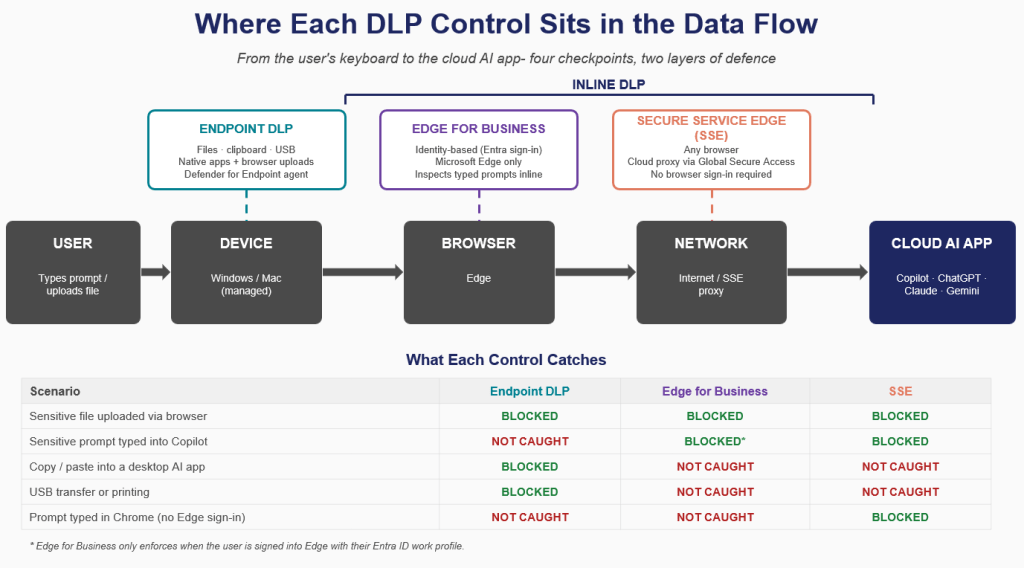
Layer 1: Endpoint DLP lives on the device:
It watches files, clipboards, USB drives, printing all the classic exfiltration paths. Brilliant at blocking a sensitive document being uploaded to a browser, or sensitive text being copy-pasted into a desktop app. But it cannot read what a user types into a web form. From its perspective, a typed prompt is just keystrokes.
Layer 2: Inline DLP is the new piece, and it has two delivery models:
This is the missing piece; and it has two delivery models. Inline DLP lives in the network path. It inspects HTTP/HTTPS traffic in real time as it travels from the browser to the cloud app. It can read the prompt, identify sensitive content, and block it before it ever reaches the AI provider.
- Microsoft Edge for Business inspects typed prompts inline, in the browser, the moment the user hits send. It works across all the AI sites- ChatGPT, Claude, Gemini, Copilot, etc. as long as the user is signed into Edge with their Entra ID work profile. Identity is the trigger.
- Secure Service Edge (SSE) does the same inspection at the network layer via a cloud proxy. It doesn’t care which browser the user is in, doesn’t care if the device is managed, and doesn’t need a sign-in. If the traffic goes through the proxy, the prompt gets inspected whether the destination is ChatGPT, Claude, or something the model catalogue hasn’t heard of yet.
If you want an enterprise-level security model for your AI tools, one layer alone is not enough. You need both implemented in your organisation, along with the four checkpoints shown in the following architectural diagram.
How this Inline DLP work in practice
When a user open AI tool in browser (yes, any browser) and type sensitive information (e.g. account number) into the prompt, the prompt is intercepted before it reaches OpenAI’s servers. The DLP engine sees account numbers matching the firm’s “customer financial data” sensitive info type. The prompt is blocked.
The key decision
Never expect only implementing DLP will resolve your issue, it required supporting elements established to enhance its capabilities.
- If you only deploy Edge for Business, you protect users who sign in and stay in Edge. Anyone on Chrome, anyone who skips the sign-in invisible.
- If you only deploy SSE, you cover everyone on the corporate network or routed through the proxy. Anyone on Chrome, anyone who skips the sign-in visible.
Edge for Business vs Secure Service Edge
Two ways to get user traffic in front of the Inline DLP engine.
Edge for Business. Users sign into Microsoft Edge with their Entra ID work profile. The browser becomes identity-aware, and Microsoft inspects traffic inline at the browser layer. Simple to deploy, very effective as long as the user signs in.
But, if the user opens Chrome, or stays signed out of Edge, Inline DLP via Edge does nothing. No identity, no policy context.
Secure Service Edge (SSE). Microsoft’s Global Secure Access routes the device’s web traffic through a cloud proxy that inspects everything regardless of which browser the user opens. No sign-in dependency. Works on Chrome, Firefox, Safari, personal Edge profiles anything. The trade-off is higher deployment complexity.
The Prerequisites
Before you can switch Inline DLP on:
- Microsoft 365 E5 or E5 Compliance
- Pay-As-You-Go billing Inline DLP runs on Microsoft’s cloud inspection infrastructure, so you need an Azure subscription with consumption-based billing enabled.
- Defender for Endpoint for device signals
- Defender for Cloud Apps (MDCA) for sanctioned vs unmanaged app awareness
- A traffic routing decision — Edge for business or SSE.
The Takeaway
If your AI governance strategy stops at Endpoint DLP, you’re protecting against yesterday’s exfiltration paths. The risk has moved into the prompt window. Inline DLP paired thoughtfully with Edge for Business and SSE is how you close that gap.
If you’re working through Copilot governance or Inline DLP design and want to compare notes, I’d love to hear how others are approaching the Edge vs SSE decision.
 techcollab365.com
One thought on “Your DLP Strategy Has a Blind Spot: AI Tools Are Walking Right Through It”