15th December 2025, Nipuna Weerasinghe
Data is the lifeblood of every organisation. It fuels decision-making, powers operations, and represents the intellectual capital that defines who we are today and who we will become tomorrow.
It is also the primary target for cybercriminals. Most attacks (all most all) ransomware, phishing, data theft, insider misuse are ultimately designed to steal, manipulate, or destroy data.
Organisations now operate in a world where data is dispersed across cloud platforms, personal devices, SaaS applications, and AI models. Traditional perimeter based security is no longer sufficient. To protect what matters most, we need a modern, coherent, and layered security strategy.
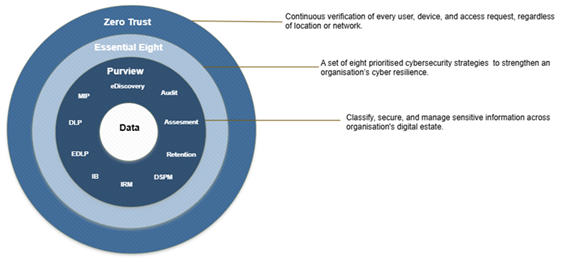
This is where Zero Trust, the ACSC Essential Eight, and Microsoft Purview intersect to create a practical, measurable, and future-ready data protection blueprint.
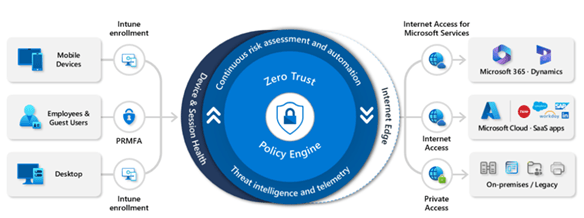
Zero Trust establishes a continuous, adaptive trust model verifying explicitly at every access attempt based on user risk, device posture, app sensitivity, location, and session behaviour. It is the real-time decision gate at sign-in and throughout the user session, ensuring access is never assumed and always contextual.
Microsoft Purview complements this by ensuring that protection stays with the data itself, no matter where it travels. Through classification, sensitivity labels, encryption, Data Loss Prevention, records management, and eDiscovery, Purview brings data centric security and governance into everyday workflows. Zero Trust controls the front door; Purview monitors and protects every room inside the house.
The Essential Eight (Australia’s most widely adopted cyber hardening framework) adds a crucial third dimension: a pragmatic, outcomes based maturity model designed to uplift organisational resilience. Its focus on hardening identity, applications, devices, and privilege aligns naturally with Zero Trust principles and creates a foundational control environment that Purview can build upon. Rather than implementing controls inconsistently, the Essential Eight encourages organisations to achieve the same maturity level across all eight areas before progressing a disciplined path toward measurable security uplift.
Why blend these three?
- Zero Trust particularly through Microsoft Entra Conditional Access applies dynamic, risk-based access decisions at the moment they matter most. This is your adaptive perimeter and access gate.
- Microsoft Purview ensures the organisation retains control over its most valuable asset (data). Protection applies during access, during use, during rest and long after data leaves the source application.
- The ACSC Essential Eight provides a common language, a minimum national baseline, and a maturity model that operational teams, executives, and auditors can all align behind.
Together, these frameworks move organisations beyond reactive security and toward a cohesive strategy where identity, devices, applications, and data operate within a single, measurable protection ecosystem. The outcome is a blueprint that is both technically robust and operationally achievable and capable of defending against modern threats while enabling productivity in a cloud-first world.
Why Zero Trust Is the Foundation
Zero Trust is built on one core principle: never trust, always verify. Instead of assuming security based on network location or device type, Zero Trust ensures that every access request internal or external is authenticated, authorised, and continuously evaluated.
Zero Trust Pillars Relevant to Data Protection
- Identity: Strong authentication and least privilege access.
- Devices: Ensuring devices meet compliance requirements before gaining access.
- Applications: Segmenting and validating access to apps and workloads.
- Data: Classifying, labeling, encrypting, and monitoring sensitive data.
- Infrastructure & Networks: Micro-segmentation and real-time threat detection.
Zero Trust is not a product it’s a strategy. But to make the strategy real, organisations need aligned controls and technologies.
The Essential Eight: Practical Controls Organisation Can Adopt
The ACSC Essential Eight is a set of prioritised mitigation strategies designed to help organisations protect against cyber threats such as ransomware, phishing, and unauthorised access.
The Eight Controls
- Application Control
- Patch Applications
- Configure Microsoft Office Macro Settings
- User Application Hardening
- Patch Operating Systems
- Multi-Factor Authentication (MFA)
- Regular Backups
- Restrict Administrative Privileges
While the Essential Eight is focused on system and operational hardening, it aligns strongly with the Zero Trust pillars especially in areas like identity, devices, and applications.
But what about protecting data itself, especially once it leaves the boundaries of corporate systems? This is where Microsoft Purview becomes a critical component in closing the loop.
Microsoft Purview: Operationalising Data Protection Inside a Zero-Trust Strategy
Microsoft Purview is a unified platform for data governance, compliance, and protection. It allows organisations to classify, label, secure, retain and monitor data across the entire digital estate whether the data lives inside Microsoft 365, on endpoints, on-premises, or in multicloud environments.
Core Microsoft Purview Capabilities for Data Protection
- Data Classification & Sensitivity Labels– Automated and manual labeling based on content, context, or user actions.
- Data Loss Prevention (DLP)– Policies that prevent sharing or exfiltration of sensitive information.
- Information Protection– Encryption, access restrictions, visual markings, and persistent protection.
- Insider Risk Management– Detects risky user behaviour such as data leakage or anomalous activity.
- Retention– Preserve the integrity and availability of critical information, preventing unauthorised deletion, enabling forensic readiness, and reducing the volume of stale data.
- eDiscovery & Audit– Ensures regulatory readiness and provides visibility across data flows.
Purview operationalises Zero Trust by placing the controls directly on the data layer, regardless of where that data travels.
How Zero Trust + Essential Eight + Microsoft Technologies Work Together
Despite originating from different domains, these frameworks share a common goal: reduce risk and protect what matters most (data).
Here’s how they align:
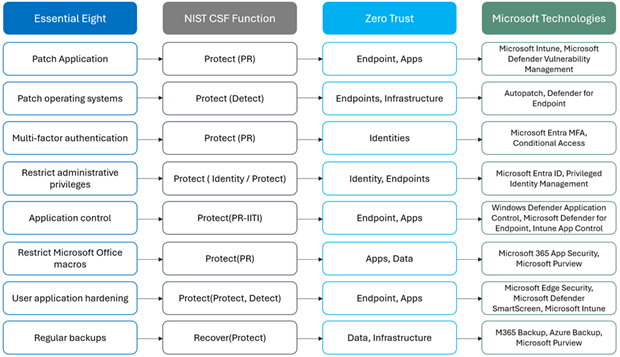
Together, these create an end-to-end security posture that is preventative, detective, and response driven.
In this blog post, I will concentrate exclusively on the critical areas that every organisation should implement and configure to safeguard their crown jewels (Data).
A Practical Blueprint for Implementing the Combined Approach
Below is a clear, actionable path organisations can follow.
Step 1: Assess Essential Eight Maturity
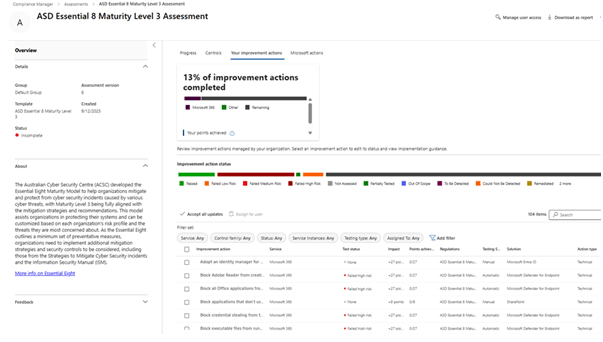
Begin by establishing your organisation’s current security posture against the Australian Signals Directorate (ASD) Essential Eight. The Essential Eight uses four defined maturity levels, Maturity Level Zero through Maturity Level Three to guide organisations in progressively strengthening their cyber resilience.
“It’s important to select and apply the assessment approach that best fits your regulatory environment. Use the most relevant templates for your country, or develop a custom assessment aligned to your organisation’s unique requirements and compliance obligations.”
Use the Microsoft 365 Compliance Manager Essential Eight Assessment to baseline your maturity level. This tool provides detailed control by control insights, identifies gaps, and recommends targeted improvements aligned to ASD guidance.
To provide a more holistic assessment across your multi cloud and hybrid environment, you can extend the evaluation for non-Microsoft services, and this enables you to:
- Assess compliance posture across Microsoft 365, Azure, AWS, and Google Cloud Platform (GCP) in a single interface.
- Perform resource-level assessments with platform-specific configuration guidance.
- View consolidated compliance scores and regulatory mappings across the digital estate.
- Access prescriptive improvement actions, including for non-Microsoft services, to help satisfy required controls.
- Regulatory mappings over 350 regulations and standards, ensuring mappings across your digital estate.
By adopting this unified approach, your Essential Eight maturity assessments will reflect your organisation’s entire cloud footprint not just Microsoft 365. This provides a strong foundation for establishing a prioritised roadmap, ensuring your security initiatives are aligned with both strategic objectives and regulatory requirements.
Step 2: Identify and Classify Your Data
A foundational element of both Essential Eight uplift and Zero Trust implementation is a clear understanding of what data you hold, where it resides, and how sensitive it is. Effective data protection requires accurate classification.
Key activities include:
- Develop a comprehensive data catalogue capturing personal, financial, health, operational, strategic, and other sensitive information categories.
- Use Microsoft Purview’s auto classification to discover and classify data across Microsoft 365 services including SharePoint Online, OneDrive, Teams, Exchange, and endpoints.
- Deploy the Purview Information Protection Scanner to classify on-premises file shares and legacy repositories.
- Extend classification to cloud infrastructure by using the Azure Purview (Microsoft Purview Data Map) scanner to analyse Azure file shares, SQL databases, and other structured data sources.
- Design a sensitivity label taxonomy aligned to your organisational risk appetite, threat model, and regulatory obligations.
(I have discussed this very high level on my recent blog post, but I’ll publish another bog post shortly with in details how to create a classification framework and sensitive information catalogue.)
Through this structured discovery and classification process, organisations gain the visibility required to implement effective security controls, automate data protection, and ensure that Microsoft 365 Copilot and other AI tools only access appropriately governed data.
Step 3: Strengthen Identity and Access Controls
Identity is the gateway to your environment, and it represents one of the most critical assets to protect. Regardless of whether your objective is safeguarding data, applications, or infrastructure, everything ultimately depends on the strength of your identity and access management strategy.
- Enforce multi-factor authentication (Essential Eight & Zero Trust requirement). MFA is one of the most effective controls for reducing account compromise and is required under both the Essential Eight and Zero Trust principles. By requiring an additional verification factor beyond a password such as biometrics or an authenticator app you dramatically reduce the risk of unauthorised access.
- Apply Conditional Access – Conditional Access is the policy engine that brings Zero Trust to life. It evaluates every sign-in attempt in real-time, using contextual signals such as user risk, device compliance, app sensitivity, and location.
Examples of conditions you can enforce:
- User risk: Trigger additional authentication or block access if the user is behaving suspiciously.
- Device compliance: Only allow access from devices that meet patching and configuration baselines.
- Location: Block high-risk countries or unknown IP ranges.
- Sensitivity labels: Require stricter controls when accessing high-value data.
- Enforce least-privilege and role-based access. Limit user access with Just-In-Time and Just-Enough-Access (JIT/JEA), risk-based adaptive policies, and data protection.
Step 4: Secure Devices and Applications
- Implement Essential Eight requirements such as:
- Application control: To achieve true data protection, it is essential to safeguard and control the applications that process or retain data. Use Intune polices such MAM and Defender for cloud app to implement application policies.
- Microsoft Intune Mobile Application Management (MAM):
- Restrict which applications corporate data can flow into.
- Block copy/paste, syncing, or saving into unapproved apps.
- Enforce app-level protections on both managed and unmanaged devices.
- Defender for Cloud Apps (CASB):
- Discover and control Shadow IT and sanctioned vs unsanctioned cloud applications.
- Apply governance actions such as blocking risky cloud apps or enforcing session controls such as enforce restricted permission or apply encrypted label on download documents.
- Intune App Control Policies (AppLocker / Windows Defender Application Control):
- Allow-list approved executables, scripts, and installers.
- Block untrusted software on Windows endpoints.
- Microsoft Intune Mobile Application Management (MAM):
- Patching cadence
- Application control: To achieve true data protection, it is essential to safeguard and control the applications that process or retain data. Use Intune polices such MAM and Defender for cloud app to implement application policies.
Regular patching of operating systems and applications is essential to closing vulnerabilities before attackers can exploit them.
- Defender for Endpoint Threat & Vulnerability Management (TVM) provides:
- Real-time insights into vulnerable software and misconfigurations.
- Risk-based prioritisation based on exploit likelihood and business impact.
- Intune Update Rings & Windows Update for Business automate patch delivery.
- Automated remediation workflows ensure critical and high-risk vulnerabilities are addressed quickly
- Macro restrictions – Apply sensitivity labels that enforce restricted macro behaviour.
- Use Endpoint DLP to ensure data leaving devices is monitored and controlled. Even on hardened, compliant devices, users may accidentally or deliberately move sensitive data to unapproved locations. Endpoint DLP ensures data remains protected even when it leaves the cloud and reaches devices.
Endpoint DLP capabilities:
- Monitor or block sensitive data being copied to USB drives.
- Prevent sensitive files from being uploaded to personal cloud storage.
- Block printing or screen capturing of protected documents.
- Track attempts to rename, compress, or archive sensitive information.
- Provide user-friendly policy tips to educate users in real time.
- Prevent sensitive files from being uploaded to personal cloud storage.
Step 5: Apply Data Protection at the Source
- Apply sensitivity labels to integrate with Microsoft 365 Copilot and other apps and services to provide access control guardrails, and encryption with rights management for your most sensitive data. Content markings, such as footers and watermarks, can increase awareness and security policy compliance. While users create or update content, the highly visible labels and labeling recommendations support user education about sensitive data. Encryption provides end to end data protection data rest and data in transit no matter where it travels the encryption security controls travels with the document.
- Enable DLP policies across: Users sometimes take risks with your organization’s sensitive data, which might result in a data security or compliance incident. Data loss prevention helps you monitor for and protect against risky oversharing of sensitive data. As with sensitivity labeling, policy tips support user education about sensitive data
- Microsoft 365
- Endpoint devices
- Microsoft Defender for Cloud Apps (for SaaS integrations)
- Information barrier for highly regulated industries such as bank, schools etc to segment access between specific users by restricting two-way communication and collaboration between groups and users in Microsoft Teams, SharePoint, and OneDrive.
Step 6: Monitor, Detect, and Respond
Once governance controls, classification, and data protection policies are in place, organisations must implement continuous monitoring and real time detection to ensure that sensitive information is not misused, exfiltrated, or accessed inappropriately. Modern AI driven environments such as those integrating Microsoft 365 Copilot require heightened visibility across user behaviour, data flows, and system interactions.
A strong monitoring and response capability ensures that controls are working as intended and provides the organisation with the ability to quickly detect, investigate, and remediate suspicious activities before they become security incidents.
Key Activities
- Leverage Insider Risk Management (IRM) to detect risky or anomalous behaviours.
Microsoft Purview Insider Risk Management uses machine learning to identify patterns such as unusual file downloads, data exfiltration attempts, policy violations, or behaviours that may indicate insider threats whether negligent, compromised, or malicious.
IRM provides contextual alerts, risk scores, and guided workflows to help security teams investigate and respond without overwhelming false positives.
- Enable and retain audit logs to support investigation, compliance, and forensics.
Unified audit logs in Microsoft Purview are essential for tracking user actions, system access, configuration changes, and interactions with sensitive information.
Retention should align with regulatory obligations (e.g., financial, health, public sector) and organisational policies typically 1 to 7 years depending on requirements.
Audit logs enable forensic analysis, support legal and HR investigations, and provide evidence for compliance audits.
- Integrate with Microsoft Sentinel for advanced analytics and incident response.
For organisations requiring centralised security operations, Microsoft Sentinel provides:
- Correlation across Microsoft 365, Entra ID, endpoints, and cloud services
- Custom detection rules for data leakage, anomalous Copilot usage, and policy violations
- Threat hunting across AI interactions and sensitive data access
- Automated playbooks to respond to incidents at scale
Integrating Purview, Defender, Copilot telemetry, and Entra identity signals into Sentinel creates a unified SOC view of data risk allowing faster detection, richer context, and consistent incident response workflows.
Step 7: Regular backup
- Use Microsoft 365 archive, Microsoft 365 Backup services or third-party tools like AvePoint
- Implement Purview Record management. Deploy policies to manage the lifecycle of sensitive data to reduce data exposure. Limit the number of copies or propagation of sensitive data by automatically and permanently deleting it when it’s no longer needed. Or conversely, protect important data from malicious or accidental deletes by automatically retaining a copy in a secured location after a user deletes the data.
- Azur back up for secure, and cost-effective solutions to back up your data and recover. You can back up On-premises files, folders, and system state, Entire Windows/Linux VMs, Azure Managed Disks, Azure file shares to a storage account, SQL Server databases running on Azure VMs, etc additionally protect from ransomware.
Step 8: Validate, Test, Improve
Achieving a secure and well governed environment is not a one-time activity it requires ongoing validation to ensure that controls remain effective as threats evolve, user behaviour changes, and organisational priorities shift.
- Conduct Regular Essential Eight Maturity Assessments
Reassess your Essential Eight maturity at planned intervals (quarterly or bi-annually) to measure progress against ASD guidelines and to identify gaps created by new technologies, evolving threats, or organisational changes.
These assessments help verify whether implemented controls such as patching, MFA, application hardening, and least privilege access are operating effectively and consistently across all platforms, including Microsoft 365, Azure, and hybrid environments.
- Run Simulated Phishing and Data Leakage Exercises
Validating human behaviour is just as critical as validating technical controls.
- Conduct phishing simulations to measure user resilience and identify high-risk groups.
- Run data leakage simulations to test DLP policy effectiveness e.g., attempts to exfiltrate labelled data through email, Teams, or external sharing.
- Validate Copilot prompt-protection and safe-response controls by simulating inappropriate prompts or attempts to use sensitive data within AI workflows.
These tests ensure your policies work as intended and highlight where refinements or additional user training may be required.
- Monitor Policy Effectiveness Using Real World Behavioural Insights
Leverage Microsoft’s telemetry such as Purview Activity Explorer, Audit Logs, DLP incident reports, and Insider Risk indicators to evaluate how users interact with classification labels, sharing links, and Copilot prompts in daily operations.
Track trends such as:
- Incorrect label selection
- Oversharing events
- Blocked DLP attempts
- AI interactions involving sensitive data
These operational insights provide a feedback loop for continuous improvement.
Based on the findings from assessments, simulations, and user behaviour analytics, refine and optimise:
- Sensitivity labels and auto-labelling rules
- DLP policies and conditions
- Conditional Access and Zero Trust controls
- Copilot prompt-handling safeguards
- Retention and lifecycle governance policies
High Level Explanation of the Architecture Diagram
The diagram illustrates high level Microsoft security and governance ecosystem, showing how identity, device management, data protection, and cloud based controls work together to enforce a unified Zero Trust, Essential Eight, and Purview driven data security model.
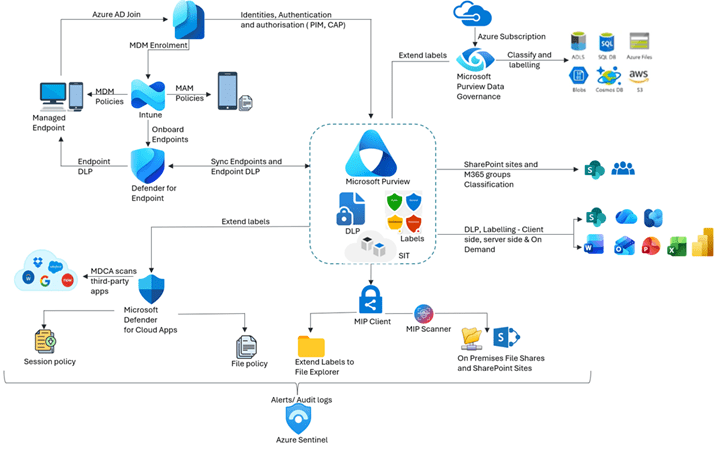
At the centre of the architecture is Microsoft Purview, which acts as the organisation’s core platform for classification, sensitivity labelling, data loss prevention, and governance of structured and unstructured data across Microsoft 365, Azure, endpoints, and third-party applications.
1. Identity & Access Foundation (Microsoft Entra)
All security controls begin with identity.
Identities, authentication & authorisation:
- Entra evaluates the user (and admin) context, applying PIM for just‑in‑time admin access and Conditional Access Policies (CAP) for MFA, device compliance, location, and risk enforcing Zero Trust principles.
This ensures only verified identities and compliant devices can access organisational data.
2. Device and Application Security (Intune + Defender for Endpoint)
Azure AD Join + MDM/MAM enrolment (Intune):
- Devices are registered and MDM policies harden managed endpoints while MAM policies protect corporate data in apps even on BYOD.
- Defender for Endpoint extends protection with endpoint DLP, monitoring and preventing sensitive information leakage directly from devices such as restricting copy, print, upload, etc.
Endpoints synchronise classification and labelling policies from Purview.
3. Data Security & Governance (Microsoft Purview Core)
Purview serves as the unified governance engine, providing:
- Sensitive Information Types (SITs) drive automated detection allowing auto labelling content at rest (SharePoint/OneDrive/Exchange) and in use.
- Sensitivity labels & encryption apply protection to content no matter where it’s travels.
- DLP policies prevent oversharing and exfiltration across Exchange, SharePoint/OneDrive, Teams, and endpoints.
- SharePoint sites & Microsoft 365 groups: Classification can be enforced at the site/group level (access, sharing, lifecycle).
- Office apps (Word, Excel, PowerPoint, Outlook, Teams, SharePoint, OneDrive, Fabric/Power BI): Users see labels, policy tips, and recommendations while working and service side labelling label documents at rest in scale.
Labels and DLP policies extend to Microsoft 365 apps (Word, Excel, Outlook, PowerPoint), SharePoint sites, Teams, and Microsoft 365 Groups.
4. Multi-Platform Data Protection (Purview + Azure + On-Premises)
Purview governance extends across:
- File Explorer & onprem: The MIP Client extends labels into File Explorer while the MIP Scanner discovers/classifies content on onprem file shares and SharePoint.
- Azure data estate: Microsoft Purview Data Governance classifies and labels Azure Subscription assets (Blobs, Data Lake Storage, SQL, Files). Similar governance patterns can be applied to multicloud locations (e.g., AWS S3, Google Cloud storage) via connectors and policy scopes.
This ensures consistent classification and protection regardless of where the data resides.
5. SaaS Security & Shadow IT Controls (Defender for Cloud Apps)
Microsoft Defender for Cloud Apps (MDCA) monitors and take necessary actions:
- Third-party SaaS platforms (e.g., Google Workspace, Dropbox, Salesforce)
- Session policies that enforce real time restrictions such as restrict download, relabelling, adding restricted permissions, etc.
- File policies (DLP) across non-Microsoft ecosystems.
- User activity such as mass download, bulk file deletion.
This closes gaps created by shadow IT and non-Microsoft data flows.
6. Monitoring, Detection & Response (Microsoft Sentinel)
All audit logs, DLP alerts, endpoint events, identity signals, and cloud activity flow into Microsoft Sentinel for:
- Centralised monitoring
- Threat detection
- Incident response
- Governance and compliance reporting
Sentinel provides a full SOC-aligned view of organisational data risks.
Key Benefits of this Integrated Approach
✔ End-to-end visibility: From identity to endpoint to cloud, you know where data lives and how it moves.
✔ Consistent security controls: Policies follow the data—internally, externally, mobile, offline, or cloud.
✔ Reduced risk of data breaches: MFA, patching, DLP, encryption, and monitoring provide layered protection.
✔ Regulatory compliance: Supports requirements across ISO 27001, SOC2, ACSC frameworks, and privacy laws.
✔ Scalable and adaptable: Because Zero Trust is a strategy, Essential Eight is a baseline, and Purview is a platform, organisations can start small and expand without disruption.
Conclusion: The Future of Security Is Integrated
In an era where cyber threats evolve daily, isolated controls are no longer enough.
The combination of Zero Trust, the Essential Eight, and Microsoft Purview provides a proven, practical, and scalable blueprint for safeguarding the most valuable asset in any organisation its data.
Whether you’re beginning a security transformation or strengthening an existing program, this integrated approach ensures your organisation is protected today and resilient for tomorrow.
 techcollab365.com