23rd November 2025, Nipuna Weerasinghe
Introduction
Data protection is no longer optional. As organisations increasingly rely on Microsoft 365 and adopt AI-driven tools such as Microsoft Copilot, the ability to classify and protect information becomes essential for security, compliance, and operational resilience. Sensitivity labels within Microsoft Purview sit at the centre of this ecosystem, shaping how information is accessed, shared, protected, and governed.
Over years of implementing Purview across regulated industries—health, financial services, legal, government, education, and critical infrastructure—one question consistently emerges:
“Should we use Mandatory Labelling, Default Labelling, Auto-Labelling—or a combination of the three?”
This naturally leads to deeper discussions:
- How do we determine our most critical Sensitive Information Types (SITs)?
- Which SITs directly influence regulatory exposure and business risk?
- What does appropriate sharing look like, and where does it cross into unsafe oversharing?
In this guide, we unpack the strengths and limitations of Mandatory, Default, and Auto-Labelling, explore effective hybrid models, and outline the governance structures that underpin successful adoption. You’ll learn how to prioritise SITs, design a classification framework that aligns with your industry, and build a scalable, user-friendly labelling strategy.
By the end, you will have a practical roadmap for building a secure, intelligent, and sustainable sensitivity-labeling model that enhances protection without disrupting productivity.
Building a Modern, Industry-Aligned Classification Framework
Before you design policies or implement technology, the very first conversation must start with a fundamental question:
“What information is sensitive, and how do we identify and prioritise it?”
This is the cornerstone of data governance. Without clarity on what constitutes sensitive information and its relative importance, every downstream decision—labels, auto-labelling, DLP, retention—becomes guesswork. The single source of truth for these decisions is your classification framework.
A robust, well-defined, industry-aligned, and continuously updated framework is essential. It must have executive sponsorship and ongoing review by privacy, legal, and compliance officers to ensure it reflects evolving regulations, business priorities, and risk appetite.
Why a Classification Framework Matters
Everything in Microsoft Purview—Sensitive Information Types (SITs), sensitivity labels, auto-labelling, retention policies, and Data Loss Prevention (DLP)—relies on this foundation. Without it, even the most advanced tools fail to deliver consistent, reliable governance.
A strong classification framework provides clarity for users, confidence for auditors, and alignment with regulatory and industry expectations.
What Should a Modern Classification Framework Include?
- Clear definitions for data types: structured, semi-structured, and unstructured.
- A precise definition of “sensitivity” and practical guidance on how to identify it.
- Classification taxonomy with descriptions, examples, and associated risk impacts.
- Handling, storage, sharing, and disposal requirements for each classification level.
- Roles and responsibilities, documented with a RACI matrix for accountability.
- A risk matrix aligned to organisational risk appetite, ensuring decisions reflect business priorities.
- Data lifecycle expectations, from creation to archival or deletion.
- A maintained Sensitive Information Catalogue (SIC) as the single source of truth.
When these elements are in place, organisations achieve clarity, consistency, and compliance while reducing friction for end-users.
The Sensitive Information Catalogue (SIC): The Engine Behind Automation
If the classification framework is the blueprint, the Sensitive Information Catalogue (SIC) is the engine that powers automation. The SIC is a curated inventory of sensitive information elements—your organisation’s definitive reference for classification, auto-labelling, and DLP enforcement.
What Makes a Strong SIC?
A mature SIC delivers:
- Comprehensive identification of all sensitive information types used by the organisation.
- Mapping each SIT to a classification label, ensuring consistency across policies.
- Defined ownership and custodianship, so accountability is clear.
- Guidance for SIT development and auto-labelling accuracy, reducing false positives.
Without a well-maintained SIC, organisations face:
- High false positives in auto-labelling.
- Inaccurate DLP enforcement.
- User mistrust of automated classification.
- Misalignment between policies and real-world data.
A strong SIC ensures that automation reflects reality not assumptions making your Purview implementation smarter, more accurate, and more trusted.
Now, let’s shift gears and explore the key labeling approaches in Microsoft Purview Default Labelling, Mandatory Labelling, and Auto Labelling and understand how each plays a role in building a robust data protection strategy.
Default Labelling: A Smooth Entry Point into Classification
Default labelling is often the first step organisations take toward building a classification culture. It automatically applies a baseline sensitivity label whenever a user creates a new document or email. This approach introduces governance without disrupting workflows—a low-friction way to start.
Why Default Labelling Works Well Initially
- Establishes a consistent baseline of protection across all content.
- Captures documents and emails that users might otherwise forget to classify.
- Provides a simple, user-friendly entry point into data governance.
- Ideal for organisations with early maturity or lower regulatory risk.
However, simplicity can become a double-edged sword.
Limitations of Default Labelling
- Users often leave the default label unchanged, even for highly sensitive content.
- Sensitive data can be misclassified, creating compliance gaps.
- Regulators and auditors view default-only models as insufficient for robust governance.
- Creates a false sense of maturity—organisations think they’re protected when they’re not.
A common question I hear from clients is:
“Which label should we set as the default?”
To guide this decision, I recommend using the bell-curve distribution model shown below. This visual illustrates how information is typically categorised across an organisation, based on risk and sensitivity.
By mapping data to this curve, stakeholders can objectively determine the most appropriate baseline label ensuring the default is neither too permissive nor unnecessarily restrictive. The model helps align your default label with real-world data sensitivity patterns and risk levels, supporting a balanced approach to information protection.
Bell curve diagram showing Default label in the amber middle section, Low Risk/Less Sensitive in green on the left, and High Risk/Highly Sensitive in red on the right. Setting your default label in the centre of the curve provides a practical starting point for most users and most data, while allowing for stricter controls on highly sensitive or high-risk information, and more flexibility for low-risk, less sensitive content.
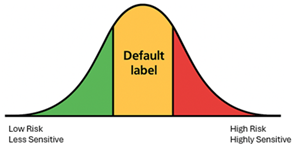
But, in many highly regulated industries, I’ve seen situations where over 95% of documents end up with the default label—regardless of their actual sensitivity. That’s a serious governance gap.
So, how do we close this gap? The next approach is Mandatory Labelling
Mandatory Labelling: Rigorous, Enforceable, and High Assurance
Mandatory labelling takes a stricter approach. It requires users to select a classification before saving or sending content. Every document, without exception, is labelled—making it a powerful tool for compliance and risk reduction.
Benefits of Mandatory Labelling
- Guarantees 100% classification coverage.
- Eliminates unlabelled and uncontrolled information.
- Strengthens audit evidence and regulatory compliance posture.
- Forces users to consider sensitivity before sharing or storing data.
- Ideal for regulated or high-risk environments.
Challenges to Expect
- Can introduce workflow friction if training and guidance are inadequate.
- Users may guess labels or select the lowest option just to proceed.
- Resistance grows when the classification framework is unclear.
- Requires strong change management and executive sponsorship.
Mandatory labelling works best when paired with clear taxonomy, user education, and leadership support. Without these, enforcement can feel punitive rather than protective.
A Balanced Approach: Default Labelling + Recommended Auto-Labelling
Many mature organisations now favour a hybrid model that combines Default Labelling with Recommended Auto-Labelling. This approach delivers the best of both worlds: a safe baseline and intelligent guidance.
Why This Works
- Default label provides a starting point for protection.
- Auto-labelling acts as a “second opinion,” prompting users when sensitive content is detected.
- Reinforces good behaviour without forcing decisions.
- Improves accuracy while reducing user frustration.
Instead of relying solely on automation or user judgment, this model creates a collaborative experience users remain in control, but with intelligent nudges from Purview.
Why Auto-Labelling Fails (And How to Fix It)
Auto-labelling is powerful, but only when executed well. It fails when:
- Using only generic SITs
- Missing custom SITs for industry-specific data
- Regex patterns generate false positives
- No Sensitive Information Catalogue exists
- No tuning or testing is performed
To fix this, organisations must invest in:
- Accurate SIT tuning
- Custom SITs for industry-specific patterns (e.g., medical identifiers, client IDs, financial account data)
- Trainable classifiers for nuanced content
- Exact Data Match (EDM) for precision
- Testing with real documents
- Continuous refinement based on analytics and feedback
This is the difference between automation that users trust—and automation they ignore.
When implemented correctly, this hybrid approach builds confidence, reduces risk, and accelerates adoption without overwhelming users.
Conclusion
Mandatory labelling, default labelling, and auto-labelling each play an important role in Microsoft Purview. The right mix depends on your organisation’s maturity, regulatory obligations, and real-world risk profile.
For most organisations especially those in government, education, and other highly regulated sectors the most sustainable and effective model includes:
- Build a clear, simple, industry-aligned classification framework as the foundation for all governance decisions.
- Maintain an evolving Sensitive Information Catalogue (SIC) as your single source of truth for SITs and automation.
- Start with Default Labelling combined with Recommended Auto-Labelling to provide a baseline and intelligent guidance.
- Develop accurate, well-tuned Sensitive Information Types (SITs) and classifiers, including custom SITs for organisation-specific data.
- Establish strong governance and executive sponsorship to drive adoption and accountability.
- Prioritise user education and cultural change to reduce friction and build trust in automation.
- Continuously refine policies, labels, and detection accuracy as regulations, business processes, and risk landscapes evolve.
When designed and managed well, Purview becomes more than a technical control—it becomes the backbone of secure, intelligent, and compliant information management across the digital workplace.
Microsoft Purview is not a one-time implementation—it evolves continuously. Regulations change, business processes shift, new types of research and intellectual property emerge, AI introduces new risk surfaces, and data volumes expand.
The organisations that succeed treat Purview as a living ecosystem, not a one-off project. Governance must adapt as the environment changes, ensuring policies remain relevant, effective, and aligned with business priorities.
 techcollab365.com
One thought on “Getting Sensitivity Labeling Right in Microsoft Purview: A Practical Guide for Modern Organisations”